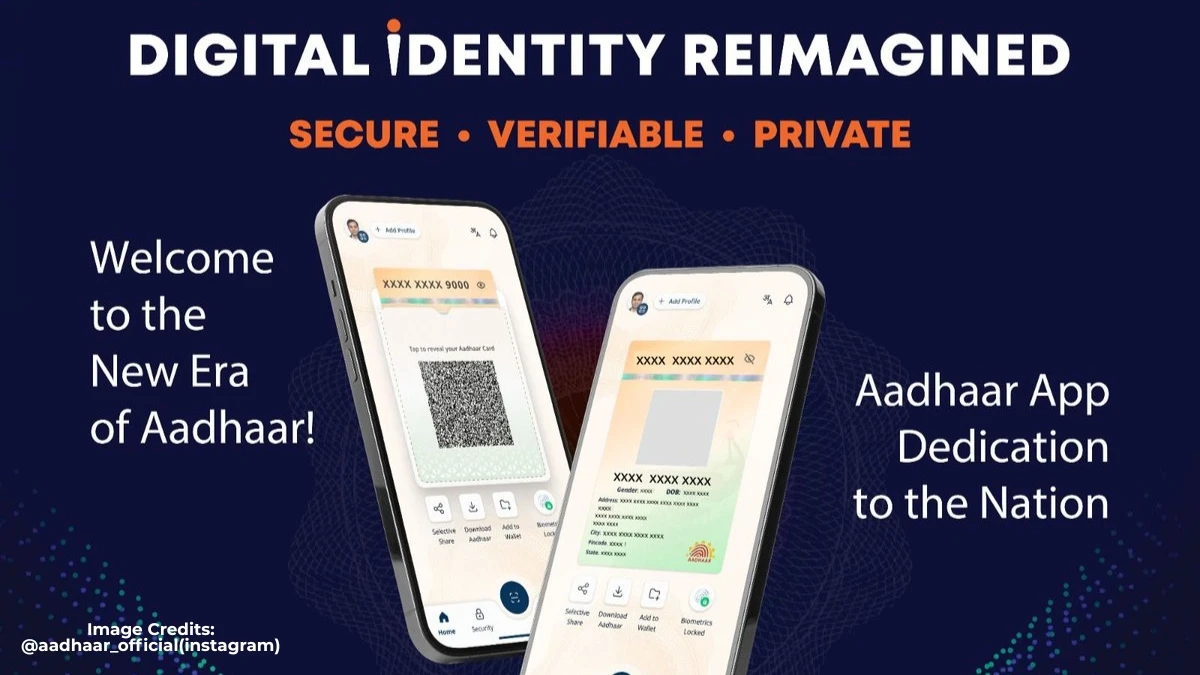

Aadhaar New App Launch
The new Aadhaar app has officially been launched by the UIDAI on January 28, 2026, as a revamped, more powerful companion to mAadhaar, giving users a cleaner, safer way to manage and share their Aadhaar directly from their phones.
Instead of juggling PDFs, photocopies, and that one slightly crumpled card in your wallet, you now get a single, upgraded app that focuses on offline verification, selective data sharing, and easy updates for things like mobile number and address.
This isn’t just a cosmetic refresh. UIDAI’s idea with the new Aadhaar app is to quietly fix the everyday pain points most of us have simply learned to tolerate: standing in queues to update details, stressing about where that photocopy of your Aadhaar ended up, or handing over more personal information than a hotel receptionist really needs.
Think of it as Aadhaar finally catching up with how we actually live, on phones, in a hurry, and slightly allergic to paperwork.
What Exactly Is This New Aadhaar App?
The new Aadhaar app is a redesigned mobile application from UIDAI, available on Google Play Store and Apple App Store, that lets you store Aadhaar digitally, verify identity offline, and update key details without visiting an enrolment centre.
It works alongside the existing mAadhaar app, not as a full replacement; mAadhaar still handles things like downloading e‑Aadhaar PDFs, ordering physical cards, or generating VIDs, while the new app leans into verification and day‑to‑day usage.
In practical terms, the new app is meant to be the thing you actually pull out at:
- Hotel check‑ins
- SIM activation
- Office or society entry
- Bank or KYC counters
…instead of digging through your bag for a plastic card or forwarding yet another Aadhaar PDF on WhatsApp. I’ve seen people at hotel receptions frantically scrolling through their gallery trying to find “final_aadhaar_latest_actual”, this app is clearly trying to kill that habit.
Key Features: What’s New and Actually Useful
The headline change in the new Aadhaar app is secure offline verification, backed by selective data sharing and better control over your identity. A few features genuinely stand out:
- Offline Aadhaar verification
- You (or a service provider) can verify identity without internet, and without sharing your Aadhaar number or biometrics.
- Share only what’s needed
- Through options like Share ID and secure files, you can send a limited Aadhaar data set, for example, just name and age, instead of your full profile.
- QR‑based verification
- The app supports QR code scanning for quick, offline checks, which is ideal for hotels, offices, events, or gated societies that don’t need your full Aadhaar, just a yes/no confirmation.
- Mobile number update from anywhere
- One of the biggest changes: you can now update the mobile number linked to your Aadhaar directly through the app, subject to authentication and a small fee. No more “please visit the Aadhaar centre between 10 and 4” just because you changed SIMs.
- Address update in‑app
- You can also submit address change requests through the app, using Aadhaar‑based verification, instead of travelling to an enrolment centre.
- Multiple profiles on one device
- The new app supports up to five Aadhaar profiles on a single device (with a shared mobile number), making it easier for one family member to manage parents’ or children’s Aadhaar when needed.
From a usability standpoint, this is the kind of stuff that quietly saves hours. It won’t feel dramatic on day one, but the first time you avoid a half‑day trip just to update a number, you’ll probably become a fan.
Privacy, Security, and the New Rules
A big part of this launch is about trust. The new Aadhaar app is designed to reduce the habit of handing over physical copies and random photocopies to everyone who asks. Instead, it pushes organisations towards registered, controlled offline verification, with UIDAI introducing a rule that entities using offline Aadhaar checks must register with the authority.
That means:
- Banks, hotels, telecom operators, and other service providers will be expected to use authorised tools and flows.
- Users get clearer control over what is shared and when, rather than leaving photocopies scattered across different offices.
For everyday users, the main security reassurance is this: you can verify identity without exposing your full Aadhaar number or biometrics, and you can lock down what data leaves your phone. Is it perfect? No system is. But it’s definitely a step up from “photocopy plus staple”.
How to Download and Start Using the New App
You can download the new Aadhaar app from the Google Play Store or Apple App Store by searching for the official UIDAI app (always check the publisher name and reviews to avoid fakes). Once installed:
- Open the app and register using your Aadhaar number and the OTP sent to your registered mobile.
- Set a PIN or passcode for the app to secure access.
- Add additional family profiles (if needed and supported) using the same registered mobile number.
After that, you can start using features like offline verification, Share ID, and update requests directly from your phone.
It’s worth spending 10–15 minutes exploring the menus once; it feels a bit like setting up UPI the first time, slightly tedious, but then it just becomes part of your normal workflow.
Why This Launch Matters
The new Aadhaar app launch isn’t just a tech update; it’s part of a bigger move towards paperless, low‑friction identity checks in everyday life.
UIDAI has been talking about making Aadhaar verification “as simple as a UPI payment”, and this app is clearly built with that mindset: quick scans, minimal data, controlled sharing, all from your phone.
For citizens, the impact is pretty practical:
- Fewer visits to enrolment centres
- Less anxiety about where your Aadhaar copies are lying around
- Easier KYC and verification across banks, telecom, travel, and hospitality
For someone who’s seen relatives postpone basic updates just because “Aadhaar centre jaana padega”, this kind of digital shift feels overdue, and, if implemented well, genuinely helpful.
It doesn’t magically solve every privacy or data‑security concern in one shot, but it does move Aadhaar closer to what it should have been from the start: something you can manage calmly from your phone, instead of a card you’re always slightly worried about losing.
Disclaimer:
The information in this article about the new Aadhaar app launch is based on publicly available updates, official announcements, and general feature descriptions available at the time of writing. Features, availability, fees, and update processes may change as UIDAI rolls out further revisions or region-specific policies. Users are advised to verify details through the official UIDAI website, app store listings, or authorised Aadhaar channels before taking any action.