
Apple Creator Studio Apps
Apple Creator Studio is a new subscription bundle that brings together Apple’s pro‑grade creative apps like Final Cut Pro, Logic Pro, Pixelmator Pro, Motion, Compressor, and MainStage across Mac and iPad, plus new AI‑powered tools in Keynote, Pages, Numbers, and Freeform.
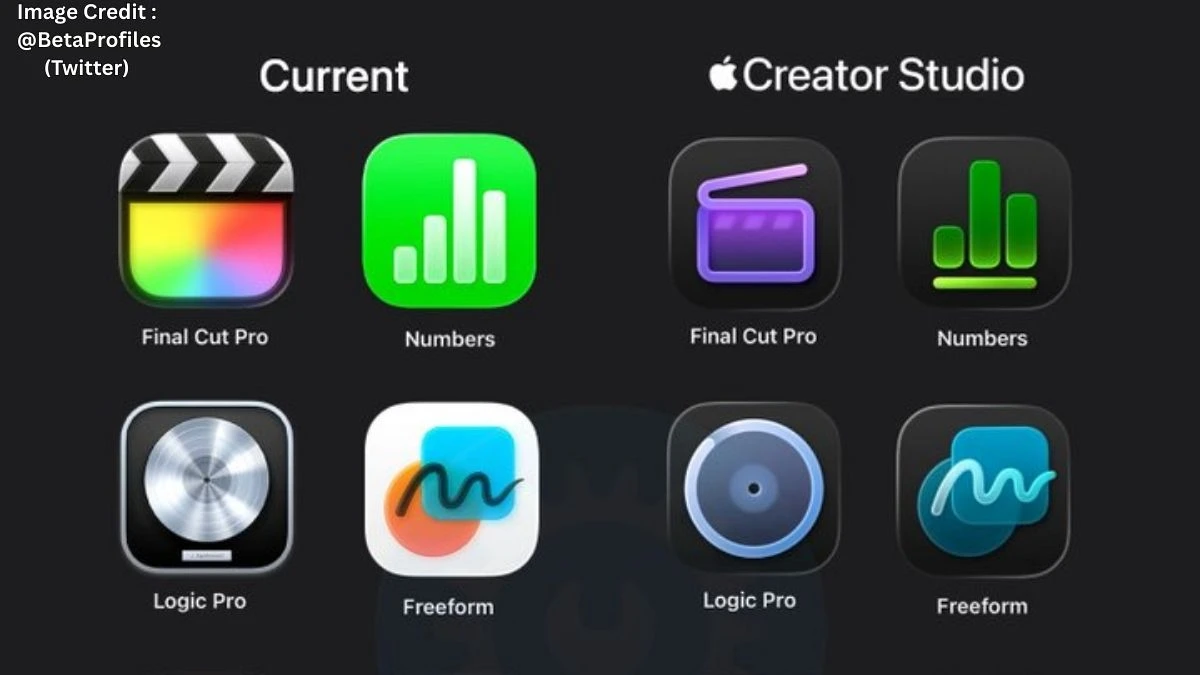
@BetaProfiles shared on X that Apple has refreshed the app icons for creative tools such as Final Cut Pro, Logic Pro, and Pixelmator Pro as part of its new Apple Creator Studio subscription.
The idea is simple but overdue: instead of juggling separate licences or piecemeal iPad subscriptions, creators get a single “studio pass” that covers video editing, music production, design, motion graphics, and even visual productivity in one place.
In practice, that means a YouTube creator can cut in Final Cut Pro, design thumbnails in Pixelmator Pro, build motion intros in Motion, and score everything in Logic Pro without worrying which device has which licence.
Apple is leaning hard on its hardware‑software integration here too: Apple silicon, Apple Pencil, and the new Apple Intelligence features drive things like Super Resolution in Pixelmator Pro, smarter selections, AI‑assisted music tools in Logic Pro, and content‑aware features inside the iWork apps.
Apple Creator Studio Price
Apple Creator Studio is priced at $12.99 per month or $129 per year in the US, with a one‑month free trial for new subscribers.
That effectively replaces the separate $4.99‑per‑month iPad subscriptions for Final Cut Pro and Logic Pro, and undercuts buying the Mac versions outright, which can run to around $500 combined when purchased individually.
In India, Apple Creator Studio starts at ₹399 per month or ₹3,999 per year, again with a one‑month free trial to test the workflow across devices. Students and educators get a much cheaper Creator Studio tier at ₹199 per month or ₹1,999 per year (about $3 / $30 in global pricing), and Apple is also bundling up to three months of free access with select new Mac and eligible iPad purchases.
For anyone who actually uses at least two of the flagship apps regularly, the math begins to tilt in favour of the bundle pretty quickly.
Apple Creator Studio Features
Apple Creator Studio’s biggest feature is access to the full suite of pro apps Final Cut Pro, Logic Pro, Pixelmator Pro, Motion, Compressor, and MainStage with cross‑device support on Apple silicon Mac and iPad. @aaronp613 shared on X, highlighting the apps included in Apple Creator Studio.
Beyond raw app access, the subscription unlocks intelligent tools like Magnetic Mask in Motion for auto‑isolating people and objects without a green screen, advanced export workflows via Compressor, and AI‑assisted beats, Session Players, and expanded sound libraries in Logic Pro.
On the imaging and design side, Pixelmator Pro inside Creator Studio gets features such as Super Resolution, Deband, Auto Crop composition suggestions, smart selection tools, and deep Apple Pencil support for detailed brush work and masking.
The bundle also turns iWork into more of a creative hub: subscribers see new AI‑powered suggestions and premium templates in Keynote, Pages, Numbers, and Freeform, plus a Content Hub filled with curated stock‑style photos, graphics, and illustrations that can be dropped straight into projects.
The overall pitch is that Apple Creator Studio gives creators a single, cohesive toolbox: edit 4K video, build motion graphics, mix tracks, design artwork, then package everything into decks or documents without leaving Apple’s ecosystem or hunting for extra licences.
For working YouTubers, podcasters, indie filmmakers, designers, and students who already live on Mac and iPad, that kind of tightly integrated bundle is exactly the sort of “less friction, more making” setup that tends to stick once it’s in place.
Disclaimer
Details about Apple Creator Studio apps, pricing and features are based on currently available public information and may change with future updates, regional pricing adjustments or new plans. Users should always confirm final app lists, system requirements and subscription costs on Apple’s official website or in the App Store before subscribing.